Skip to content

Free resource for US real estate investors

Seller follow-up emails that keep the next step clear

Eight editable emails for US real estate investors and acquisition teams, from a seller's first inquiry to an agreed follow-up after an offer. Start with what actually happened, ask for one next action and review the message before sending.

A free plain-text pack with the same subjects, messages and review notes shown below. No account or email address required. The examples use editable placeholders, not real seller data.

Content reviewed .

Short product demos

See a seller reply become a draft and next task

Silent examples with fictional US investor data. Load a player when you want to watch; captions and transcripts describe each scene.

The video is not loaded. Load its controls when you are ready; playback remains under your control.

Silent demo

Seller follow-up, with a next action

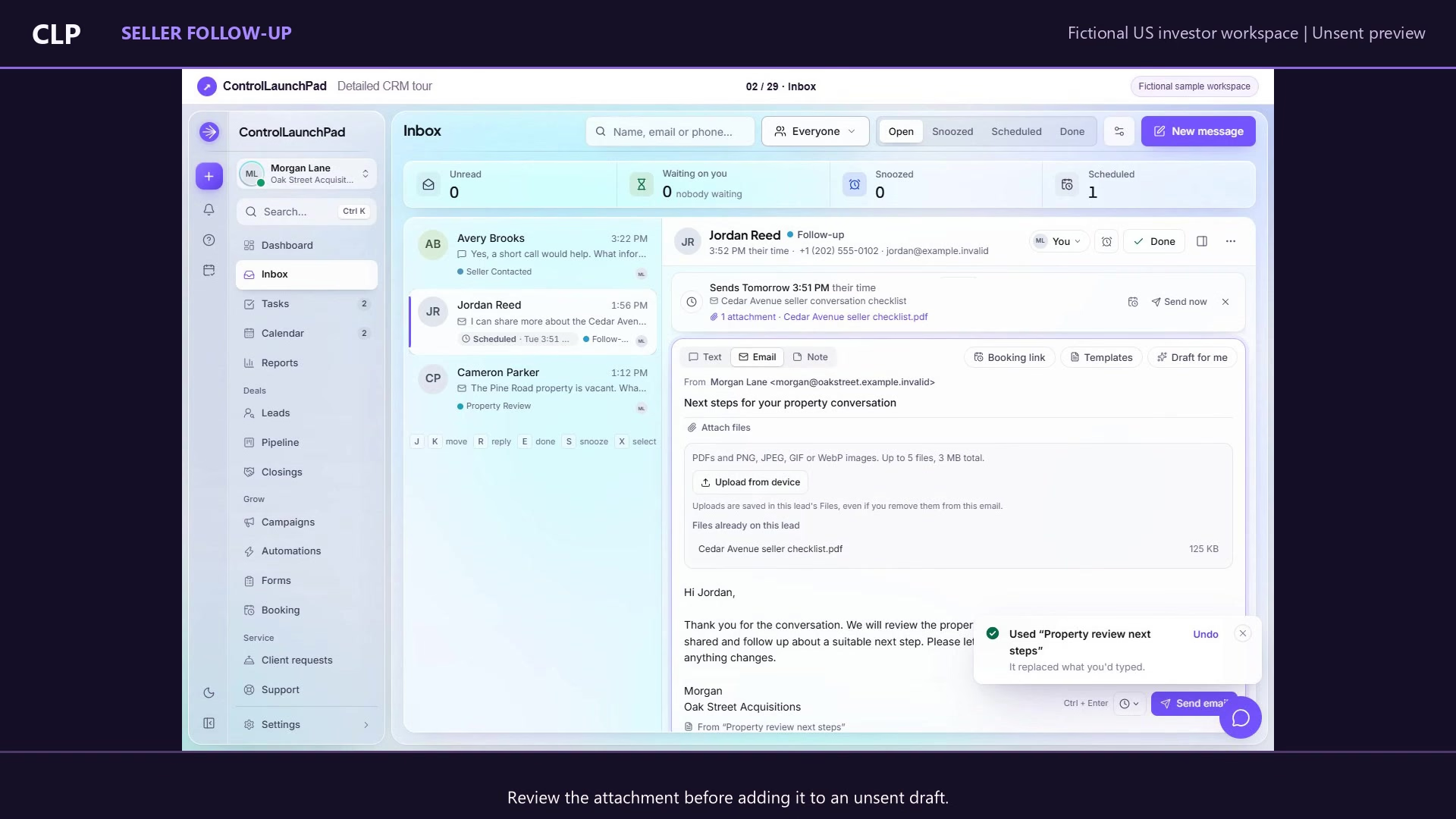
Read the conversation. Prepare a draft. Assign the follow-up.

Fictional workspace. No email is sent or scheduled.

Read transcript for Seller follow-up, with a next action
  1. Review the seller conversation, prepare a draft, then give the next action an owner.

  2. 1. Read the existing email thread and seller context before replying.

  3. 2. Choose a saved template, then edit the message for this seller.

  4. Review the attachment before adding it to an unsent draft.

  5. Check the proposed send time and time zone. Nothing is sent or scheduled here.

  6. 3. Review upcoming follow-ups, then open the linked task.

  7. Use the task list to decide which lead needs attention next.

  8. Confirm the responsible teammate, due time and notes.

  9. Explore the full workflow and free seller email templates at controllaunchpad.com.

Download English captions

What should a seller follow-up email say?

A useful seller follow-up email refers to the last real conversation, confirms the correct property, asks one clear question or proposes one agreed next step, and identifies the sender. Match the message to the seller's timing and contact preferences. A template is a starting point, not a substitute for reading the lead's conversation.

Adapt the message to the conversation

  1. Read the conversation first

    Confirm the seller, property, last message and contact preferences. Choose the template for the current stage, rather than sending every example as a sequence.

  2. Replace every placeholder

    These square-bracket labels are instructions for manual editing. They are not CLP's automatic fill-in syntax. Replace or remove them and check that no labels remain in the subject or body.

  3. Keep a reply with its conversation

    When replying to an existing email, keep the original thread's subject instead of replacing it with the example subject. Check the recipient, sender and attachments before sending from your connected mailbox.

  4. Record the next action

    Save the agreed task or appointment with a responsible person and a time zone. If plans change or the seller asks you to stop, review scheduled messages and active follow-up as well as the lead's notes.

Eight seller follow-up email templates

These are fictional, editable examples. Select the subject or message text to copy it, or download the complete pack. Each example stands on its own; these are not eight steps to send automatically.

01New inquiry

Respond to a seller inquiry

A seller has contacted your team about a property. Acknowledge the actual request and ask for one next step.

SubjectYour inquiry about [Property address]

Hi [First name],

Thanks for reaching out about [Property address]. I'm [Your name] with [Company]. I'd like to understand what you're hoping to do and the timing that works for you.

Would [Option A, including time zone] or [Option B, including time zone] work for a short conversation? If email is easier, let me know your preferred timeline and any questions you'd like us to cover.

Thanks, [Your name] [Company] [Your contact details]

Before sending

Confirm the inquiry belongs to this seller and property. Offer times you can actually keep; do not imply you have inspected the home or made an offer.

02Agreed next action

Confirm a requested callback

The seller has asked you to call at a particular time. Restate that agreement rather than starting a new pitch.

SubjectOur callback about [Property address]

Hi [First name],

Following up on your request, I'll call [Confirmed phone number] on [Day, date] at [Time and time zone] to discuss [Agreed topic] for [Property address].

If that time no longer works, reply with a better option and I'll confirm it with you. There is nothing you need to prepare unless you have questions you'd like me to review first.

Thanks, [Your name] [Company] [Your contact details]

Before sending

Verify the seller requested this callback, the phone number is correct and the matching task has the same date, time and time zone.

03Appointment

Confirm an agreed property visit

A visit is already agreed. Confirm the address, attendees and access instructions without treating an unanswered invitation as a booking.

SubjectConfirming our visit to [Property address]

Hi [First name],

Thank you for arranging a visit to [Property address] on [Day, date] at [Time and time zone]. [Attendee name] from [Company] will meet you at [Agreed meeting point].

We'll use the visit to understand the property's condition and discuss your questions. Please let us know about any access instructions or areas we should avoid.

If your plans change, reply here so we can agree on a new time.

Thanks, [Your name] [Company] [Your contact details]

Before sending

Check that the appointment is saved and agreed. Share access information only with the people who need it; do not ask for alarm codes or keys in a widely shared email thread.

04After the visit

Recap the property visit

The visit has happened. Record what was discussed, what remains unknown and who owns the next step.

SubjectNext steps after our visit to [Property address]

Hi [First name],

Thank you for showing us [Property address] on [Visit date]. My understanding is that [Brief factual summary of the seller's stated priorities]. Please correct anything I've misunderstood.

The next step we agreed is [Specific action]. [Responsible person] will follow up by [Agreed date]. We still need to confirm [Open question or item], so I don't want to make assumptions about it.

Is there anything else you'd like us to consider before that next conversation?

Thanks, [Your name] [Company] [Your contact details]

Before sending

Use the actual visit notes and the seller's words. Remove any claim about property value, repairs or timing that your team has not verified.

05Offer preparation

Clarify a question before preparing an offer

You need one factual answer before discussing terms. Keep the email focused and avoid presenting an estimate as an approved offer.

SubjectOne question about [Property address]

Hi [First name],

Before we finish reviewing [Property address], could you help us confirm [Specific factual question]? It will help us understand [Why the answer matters to the review].

If you don't know the answer yet, that's fine. Let me know what is still uncertain so we can decide how to check it together.

I'll follow up on [Agreed day] with [Next action]. This email does not include an offer or a commitment to purchase.

Thanks, [Your name] [Company] [Your contact details]

Before sending

Ask only for information needed for this review. Check your calculations separately and use your team's reviewed offer documents for proposed purchase terms.

06Offer discussion

Follow up on an offer already shared

Your team has actually sent an offer and the seller agreed to a follow-up. Invite questions without inventing a deadline or acceptance.

SubjectQuestions about the offer for [Property address]?

Hi [First name],

As agreed, I'm checking in on the offer we shared on [Offer date] for [Property address]. Have you had a chance to review it, and are there any terms or next steps you'd like us to explain?

I can arrange a conversation at [Available time and time zone] or reply here if email is easier. If your plans or priorities have changed, please let me know so we can update our notes.

Any deadlines or conditions remain those in the offer documents; this message does not change them.

Thanks, [Your name] [Company] [Your contact details]

Before sending

Confirm which offer version was shared and the agreed follow-up date. Do not add urgency, change terms or describe the offer as accepted without a basis.

07Seller's timeline

Check in on an agreed later timeline

The seller asked you to reconnect later. Refer to that request and let them choose whether the conversation should continue.

SubjectChecking back as agreed about [Property address]

Hi [First name],

When we last spoke on [Conversation date], you asked me to reconnect around [Agreed timeframe] about [Property address]. Is that still a useful time to talk, or would you prefer to leave things paused?

If you'd like to continue, let me know what has changed and the best next step for you. If you don't want further follow-up, please tell me and I'll update our records.

Thanks, [Your name] [Company] [Your contact details]

Before sending

Check the seller's requested date and contact preferences. A paused record is not permission to restart a sequence or repeatedly email a person who has asked you to stop.

08No next action agreed

Close the loop respectfully

An existing conversation has gone quiet. Give the seller a clear choice and make your next internal action match the message.

SubjectClosing the loop on [Property address]

Hi [First name],

I haven't heard back about [Last agreed topic] for [Property address], so I'll close out this follow-up for now rather than keep sending reminders.

If you'd like to revisit the conversation later, you can reply here. If you prefer no further contact, let me know and I'll update our records.

Thank you for your time, [Your name] [Company] [Your contact details]

Before sending

Use this only if you will actually stop this follow-up. Review scheduled emails, tasks and campaign enrollment, and honor any existing request not to be contacted.

Replace the editing prompts

The bracketed labels below are reminders for you, not automatic CRM fields. Keep only details relevant to the seller and remove anything you cannot verify.

[First name]
The seller's correct preferred name.
[Property address]
The property in this specific conversation, including the city if it avoids confusion.
[Time and time zone]
An agreed or genuinely available time, written with its time zone.
[Specific action]
One action that a named person can complete and check.
[Your contact details]
Your team's appropriate reply/contact information and usual reviewed email footer.

Keep the complete email pack

A free plain-text pack with the same subjects, messages and review notes shown below. No account or email address required. The examples use editable placeholders, not real seller data.

Save a working copy and adapt one email at a time. The file does not import contacts, configure automatic fill-ins, create a campaign or send anything.

Seller email template questions

Are these seller email templates free to use?

Yes. You can read and manually adapt all eight emails or download the plain-text pack without a CLP account. Replace the placeholders and use your own team's reviewed sender details and email footer.

Do the square-bracket placeholders fill themselves in CLP?

No. Labels such as [First name] and [Property address] in this resource are manual editing prompts. They do not use CLP's automatic fill-in syntax. Replace every label before sending, or configure and preview the actual supported fill-ins in your saved CRM template.

Should I change the subject when following up by email?

For a reply in an existing conversation, keep the original thread's subject. The sample subjects are for a new conversation when appropriate; changing a reply's subject may create a separate thread in the recipient's mailbox.

How often should I follow up with a seller?

Use the timing the seller requested or agreed to. These emails are individual examples, not a fixed daily sequence. If there is no next action agreed, ask whether the seller wants to continue instead of inventing urgency or repeatedly sending the same message.

Can I use these emails as a purchase offer or contract?

No. The examples help with conversation and follow-up; they do not establish purchase terms or replace reviewed offer documents. Verify the actual offer version, conditions and any deadlines before discussing them with the seller.

Can I use the messages in ControlLaunchPad?

Yes. Adapt the text in an email to the appropriate lead, or use it as the starting point for a saved email template. A connected Gmail mailbox is needed to send your real lead email through Gmail. Downloading this pack does not connect a mailbox, create templates, enroll leads or send messages.

Keep the conversation and its next action together

See how your team can review the lead conversation, prepare an email and keep follow-up work with the right record.