How can an investor team review a deal before an offer?
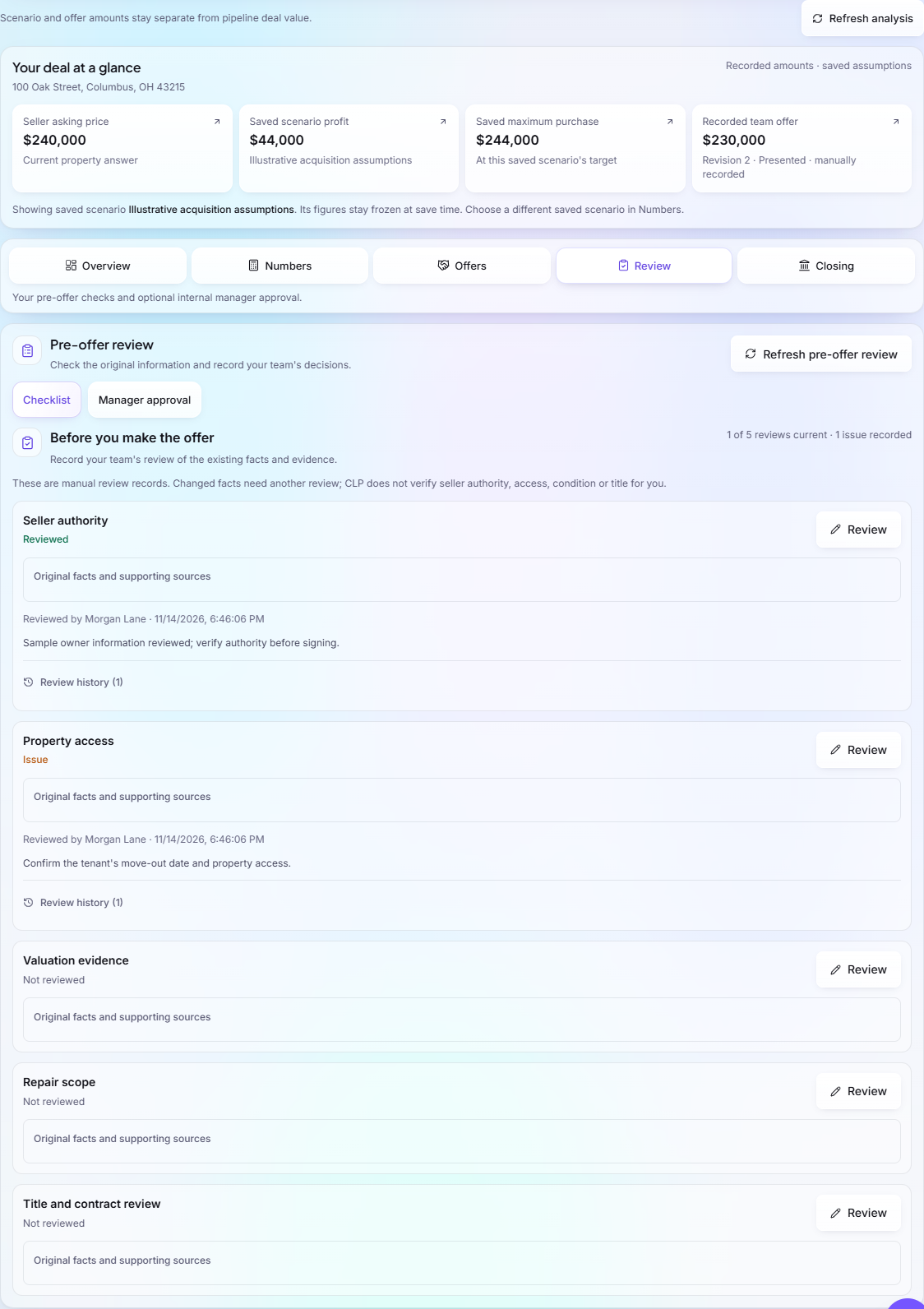
Check the original seller and property facts, review recorded comparable sales and repair items, and choose an explicit saved scenario. Record the team's pre-offer review against its current evidence. If internal manager review is enabled, submit the specific saved scenario and recorded offer revision for a separate internal decision.
Open larger screenshot
Before you start
- An open deal linked to the correct seller, with access to the relevant source facts and files.
- Permission to edit the deal when adding evidence, scenarios, reviews or recorded offers.
- Property research and cost assumptions supplied by your team; CLP does not fetch or verify an automated valuation for this workflow.
Put the workflow into practice
Review the original property answers
Open the deal and inspect the seller's reported facts, property context and missing information. Confirm which evidence supports those answers before using them in a calculation or review.
Create a task for an unanswered question rather than substituting an assumed fact.
Inspect recorded comparable-sale evidence
Review the comparable sales your team entered, including their source details and relevant property characteristics. The tool organizes that evidence; it does not establish an appraisal or verify the source for you.
Check the recorded comps and review any proposed use of their indicated value.
Review repair scope and assumptions
Open the repair worksheet and inspect its items, quantities, entered costs and any selected contingency. Keep the reasons for those inputs with the evidence and separate a working estimate from a verified quote.
Review the current repair evidence before applying any value to the original answers.
Choose and save an explicit scenario
Review the calculator's recorded inputs and assumptions, then save a scenario you want the team to assess. A saved scenario preserves its original inputs; changed current facts do not silently rewrite that snapshot.
Name the scenario clearly and check whether its inputs differ from the current record. For a separate local worksheet, try the free fix-and-flip calculator; it does not save a CRM scenario.
Record the pre-offer review
Review the existing facts, valuation and repair scope with supporting files or tasks. Mark each manual review as appropriate and record issues. Changed facts can make an earlier review need attention again.
Record what was checked, the supporting sources and the unresolved next action.
Review the exact offer and internal decision
Inspect recorded team offers and seller counters. Where manager review is enabled, select a saved Flip scenario and the recorded team-offer revision for submission. This creates an internal review record; it does not send an offer to the seller.
Confirm the recorded revision and decide the next authorized communication separately.
Illustrative seller scenario
A repair question changes the team's next step
In this fictional example, the team has a saved scenario for Avery's rental. A new condition detail makes the earlier repair scope incomplete. Morgan adds a task to obtain the missing evidence and reviews the current records before recording a new decision. The saved scenario remains a historical snapshot; the team does not treat its old assumptions as newly verified facts.
Set up your workspace for this workflow
Keep figures and decisions separate
Scenario calculations, pipeline deal values, recorded offers and manager decisions have different purposes. Start with the lead and deal definitions when explaining which record is under review, then identify the specific saved scenario or offer revision before using a figure in a conversation.
Treat approval as an internal workflow
Manager review is a separate team decision where enabled and permitted. It is not underwriting, a property verification, an e-signature or authorization to send an offer automatically.
Common pitfalls and the next useful action
Using an old scenario as if it held current facts
Compare the saved inputs with current property answers and evidence. Preserve the old scenario for history and create a fresh reviewed scenario when the decision needs updated assumptions.
Marking a review complete after merely opening a source
Read the evidence and record the actual assessment and issues. Opening a file or comparison does not itself mark the manual pre-offer review complete.
How this guide was reviewed
Reviewed the deal evidence and saved-scenario interface and the service logic for manual pre-offer checks and internal manager decisions.
- Checked that comparable sales, repair items and cost assumptions are team-entered evidence and that saved scenarios preserve an input snapshot.
- Checked that changed review context can make earlier manual checks or manager submissions stale.
- Checked that manager submission selects a saved Flip scenario and the exact recorded team-offer revision, and that recording or approving it does not send a seller offer.
No live deal was changed and no investment outcome was tested. These tools organize entered evidence and internal decisions; they do not fetch an independently verified valuation, provide an appraisal or validate legal authority.
Evidence, pipeline and handoff workflows
Deal review before an offer questions
Does CLP generate an automatic property valuation?
This workflow uses property answers, comparable-sale records and cost assumptions entered and reviewed by your team. It does not fetch or verify an automatic valuation or replace an appraisal.
Do saved scenarios change when the property answers change?
A saved scenario keeps its original input snapshot. Review differences from current facts before using it for a new decision.
Does saving an offer or requesting approval send it to the seller?
No. These actions record offers or internal review work. Decide and perform any authorized communication through the appropriate separate channel.
What is included in an internal manager review?
Where enabled, your team submits a saved Flip scenario and a specific recorded team-offer revision. The review preserves the submitted context for a separate internal decision. Other investment scenario types are not interchangeable with that submission.
Try this workflow with your next seller lead
Start a 14-day free trial, set up your channels, and walk through the steps with a test lead.