What belongs in a real estate acquisitions pipeline?
Use stages that reflect your actual acquisition process, with evidence for entering each stage and a specific next action. Keep the owner, property context, latest conversation, recorded deal value and expected close date current. Review stale or incomplete opportunities before moving them forward.
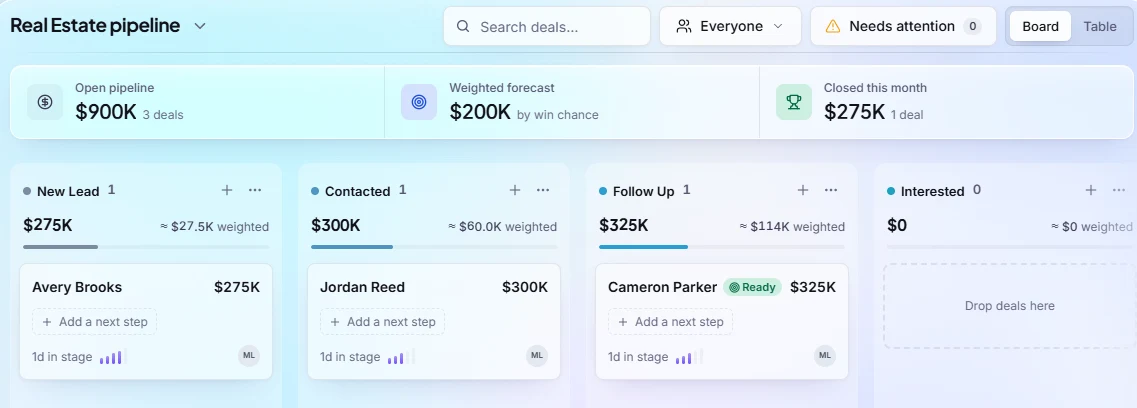
Open larger screenshot
Before you start
- Permission to configure or use the relevant pipeline and edit the records you manage.
- Agreed stage names and a shared definition of what qualifies an opportunity to move.
- Starter includes one pipeline; Pro and higher plans support additional pipelines within plan limits.
Put the workflow into practice
Define the review question for each stage
Agree on what the team needs to know at each point, from a new inquiry to a recorded offer or closing handoff. Keep a pipeline stage separate from a deal's outcome. The example table below is a starting point for discussion, not a required CLP stage configuration.
Write an entry criterion and next-action expectation for each stage.
Configure the pipeline around that process
Name and order the stages your team actually uses. Avoid creating a new stage for every temporary note; use dated tasks for work that can happen within the same stage.
Review the stage settings and explain the chosen definitions to the team.
Check the seller and deal context
Open the lead before a review and confirm the property, owner, recent conversation and outstanding questions. Keep reported information separate from checked evidence. A stage label alone does not verify an offer, contract or property fact.
Update the lead's context and record what remains unconfirmed.
Give every active opportunity a next action
Review the board or table and create a useful task for the next conversation, evidence check or document request. Include its assignee and due time rather than relying on a stage change to tell someone what to do.
Record the next action, responsible person and due date.
Update values and dates when information changes
Deal values, expected close dates and probabilities are working inputs maintained by the team. Revisit them as negotiations change, and distinguish a recorded deal value from a saved calculation scenario or seller counteroffer.
Review the original source before changing a figure or forecast.
Review the handoff into closing
Moving an eligible open deal into a stage configured to start closing queues or starts its closing tracker. The move can finish before the tracker is available. Check the tracker, recorded agreement, key dates and next responsible teammate before treating the handoff as complete.
Review the closing tracker, its checklist and the next task; investigate if the tracker has not appeared.
Illustrative seller scenario
A weekly review of an offer awaiting a response
In this fictional example, the team records an offer discussion on Avery's rental and keeps the opportunity in the stage its review criteria support. Morgan owns a task to confirm the seller's response. A proposed closing date remains an estimate until the relevant agreement and dates are recorded; moving the card alone does not supply that evidence.
An example acquisitions stage definition
These are illustrative stage names and review criteria. Configure your own stages and agree on the evidence your team needs before moving a deal.
| Stage | Entry evidence | Owner | Next action |
|---|---|---|---|
| New inquiry | Seller and property recorded; source and unanswered intake questions visible. | Intake teammate | Confirm the best contact method and assign the first response. |
| Contacted | An actual conversation or response is recorded, with the seller's timeline and preferences. | Acquisitions owner | Agree on a callback, consultation or property-access question. |
| Appointment booked | A confirmed appointment has a host, time zone and purpose. | Appointment host | Review the seller history and prepare the questions for the meeting. |
| Deal review | Property research, comparable-sale notes, repair assumptions and unresolved questions are saved. | Deal reviewer | Check the assumptions and request missing evidence before an offer decision. |
| Offer sent | The actual offer and its terms were sent; its version and the seller's response are recorded. | Acquisitions owner | Set the agreed follow-up and record the next negotiation step. |
| Under contract | An executed agreement and relevant dates are confirmed separately from an accepted verbal offer. | Transaction teammate | Review the closing tracker, assigned tasks and outstanding documents. |
| Closed | The team has confirmed completion using the transaction's closing records. | Transaction teammate | Complete remaining tasks and keep the final records together. |
| Follow-up or closed lost | The reason, latest seller request and whether future contact is appropriate are recorded. | Acquisitions owner | Set an agreed future task or stop contact and close outstanding work. |
Download a working template
- Download the pipeline review CSV
A blank review worksheet for manual planning. It does not create CRM stages, tasks or appointments.
Set up your workspace for this workflow
Use the worksheet for review, then update CLP
Record review notes in the CSV if useful, then update the actual lead, deal and task in CLP. The worksheet is not a dedicated pipeline importer and does not apply changes automatically.
Keep forecasts connected to their inputs
A forecast depends on the values, dates and probabilities the team records. Review those inputs alongside the seller conversation and transaction records before relying on the board's totals.
Common pitfalls and the next useful action
Moving a deal to make the board look current
Use the agreed entry evidence and record why the move is appropriate. If the team is only waiting for a callback, retain the supported stage and create the callback task.
A stage with no responsible next action
Confirm the owner and task during the review. Stage-age alerts can draw attention to waiting work, but someone still needs to choose and own the next useful action.
How this guide was reviewed
Reviewed the pipeline settings interface, deal records, plan catalog and closing-start source used by this acquisitions workflow.
- Checked the one-pipeline Starter allowance and the higher-plan pipeline limits.
- Checked that board values and weighted totals use recorded deal values and stage probabilities, rather than independently verified property values.
- Checked that eligible entry into a stage configured to start closing queues or starts a closing tracker, which must be reviewed after the move.
This review did not move live deals or test background-job execution. Example stages are illustrative team definitions, and the CSV is a manual review worksheet rather than an importer or a forecast guarantee.
Pipeline review resources
Acquisitions pipeline questions
Are the stage names in the table CLP defaults?
No. They are illustrative names and review criteria for an acquisition process. Configure the names and order that fit your team and agree on what evidence supports each move.
Can I manage more than one acquisitions pipeline?
Starter includes one pipeline. Pro and higher plans allow additional pipelines within their plan limits. The current pricing page lists each allowance.
Does downloading the worksheet create a pipeline?
No. The CSV is a manual review worksheet. It does not create or update CLP stages, deals, tasks or appointments.
Can a stage change start follow-up work?
A configured and enabled automation can respond to a stage change with steps such as a task or a message through a supported connected channel. Review the automation and channel readiness before relying on it.
How does a deal enter the closing workflow?
Configure a stage to start closing. An eligible open deal entering that stage queues or starts its closing tracker; the stage move may finish first. Check that the tracker is available, then review its key dates, supporting records and assigned work.
Try this workflow with your next seller lead
Start a 14-day free trial, set up your channels, and walk through the steps with a test lead.