What should happen when a new seller lead arrives?
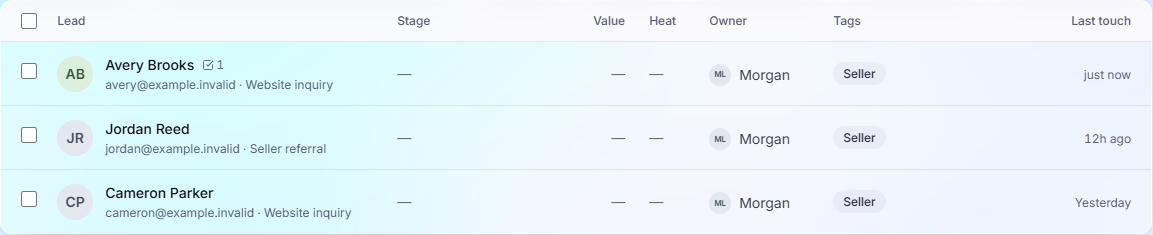
Check whether the seller or property is already represented, capture the contact and property context, record the source and contact preferences, and assign an owner. Finish by creating the next useful task rather than treating a newly saved record as a completed intake.
Open larger screenshot
Before you start
- Access to the correct workspace and permission to create or edit the seller record.
- The original inquiry or conversation, so contact details and the source can be checked.
- A short agreed intake checklist; use relevant fields or notes for facts that are still missing.
Put the workflow into practice
Review the original inquiry and possible matches
Open the source message or form and search existing leads before adding another record. Similar contact details or the same property may belong to an existing conversation that needs updating. If moving an existing list, use the migration checklist to review matches and a small pilot before a full import.
Decide whether to update the existing record or create a new seller lead.
Capture contact and source details
Record the seller's name, available phone or email, source and preferred contact method. Preserve any request about timing or stopping contact. A phone's area code is not a reliable way to choose a time zone.
Confirm the best contact method and the time zone used for follow-up.
Record the property and decision context
Capture the address, reported occupancy, condition concerns, selling reason and timeline. Ask the person's relationship to the property and whether others are involved, without treating the response as verified authority.
Label reported facts and mark unanswered questions as unconfirmed.
Assign the acquisition owner
Choose the teammate who should take the next conversation. Check their current responsibilities and whether the record already has open work so the inquiry has one clear next owner. The first-week setup checklist includes an ownership and handoff check to complete with a test lead.
Review the lead owner and existing tasks before adding new work.
Create the first useful next action
Use a dated task for an agreed callback, missing information or access question. If a meeting has actually been arranged, record the appointment separately with its details and host.
Write the specific action, assignee, due time and time zone.
Review the handoff and update after contact
Ask whether a teammate could open this record and understand why the seller contacted you and what happens next. After the conversation, update the outcome and replace the earlier task with the current plan.
Keep the latest context and next action together with the lead.
Illustrative seller scenario
A website inquiry with an unknown move-out date
In this fictional example, Avery asks about selling the Oak Street rental but has not confirmed when the tenant will move. Morgan checks for an existing record, records the email preference and tenant-occupied status as seller-reported, and creates a task to clarify timing. No guessed date is entered as a commitment.
Set up your workspace for this workflow
Use the free intake worksheet as a planning aid
The worksheet helps your team decide what to collect. Its task and appointment columns do not create CRM records. Review supported fields and column mapping if importing leads, then create the actual follow-up work in CLP.
Give unknown information a visible home
Use notes or relevant fields to distinguish missing information from a negative answer. An asking price that was not shared is different from a recorded zero amount.
Common pitfalls and the next useful action
Creating a second record for a returning seller
Search the existing lead list and compare the source and property context first. Review a potential match instead of splitting the same conversation across records.
Completing fields with assumptions
Keep a fact unconfirmed until the seller or a checked source supplies it. Create a task for the missing information rather than turning a guess into a pipeline decision.
How this guide was reviewed
Reviewed public-form intake, lead matching and source records, and the CSV mapping and dry-run interface behind this seller intake guide.
- Checked that intake preserves contact and source context and can match an existing lead rather than treating every inquiry as a new person.
- Checked active teammate ownership eligibility and the need to review existing open work before changing responsibility.
- Checked that supported CSV fields use mapping and preview planning; a planning worksheet's task or appointment columns do not create those records.
No live form submission or customer import was performed. Matching details and field mappings need a pilot with the team's own export. This workflow does not verify seller authority or promise to recreate historical conversations and activities.
Intake resources and next workflows
Seller lead intake questions
Which seller details should I capture first?
Start with contact details and preferences, property context, source, selling reason, timeline, an assigned owner and the next action. Keep unconfirmed information visibly unconfirmed.
Can I use the intake CSV in CLP?
CLP supports lead CSV imports with column mapping and a dry run. The worksheet is not a dedicated import format, and task or appointment columns do not create those records automatically.
Does saving a lead arrange its first appointment?
No. Assign an owner and create the appropriate task or appointment explicitly, or use an automation your team has configured and tested.
What if the seller has not shared a price or timeline?
Record it as not shared or unconfirmed. Give the next conversation a useful question instead of assuming a number or date.
Try this workflow with your next seller lead
Start a 14-day free trial, set up your channels, and walk through the steps with a test lead.