Can I connect my own Twilio account to ControlLaunchPad?
Yes. A workspace member who can manage settings can link a Twilio account in Settings → Phone & texting using its Account SID, Standard API key SID and API key secret. CLP prepares the calling and texting connections. Live calls need a ready account and an eligible calling number; live Twilio texts also need an approved texting campaign and a number registered on it.
Open larger screenshot
Before you start
- Access to the Twilio account your business will use, and permission to manage settings in the correct CLP workspace.
- The Account SID and a Standard API key SID and secret from that same account. Keep the secret private and save it securely when Twilio shows it.
- An upgraded Twilio account with sufficient funds for live use. Twilio bills the account for its numbers, usage and applicable registration charges; your CLP plan is separate.
- Accurate business information, the intended texting use case, message examples and a documented way people agree to receive your texts. Registration approval and permission to contact a particular seller are separate matters.
- A separate phone you control and a test lead for checking calls and texts. For browser calls, use a working microphone, speakers or headset, and a reliable connection.
Connect and test your integration
Prepare a Standard API key in the right Twilio account
In Twilio's Console, open API keys and tokens and create a Standard API key. Keep its SID and the secret shown at creation, along with the account's Account SID. CLP expects a Standard key; a Main key has broader access and is refused, while a Restricted key may not grant the resources this connection needs. Do not enter an Auth Token in the API key secret field.
Check that the Account SID starts with AC and the API key SID starts with SK, and that both belong to the account you intend to connect.
Link the account in Phone & texting
Open the correct CLP workspace, then Settings → Phone & texting. Choose Link Twilio or Start linking, enter the three values, and accurately select whether the Twilio account has been upgraded. Submit the connection and review its setup progress. CLP checks access and prepares the resources used for calls, texts, registration updates and webhook verification.
Wait for the account to show Linked. If it needs attention, review the stated reason and use Check now or the account settings rather than repeatedly submitting different credentials.
Review your business registration
Follow the Business step. CLP can discover a registration already present in the linked account. Depending on the enabled setup, it either offers the in-app registration form or guides you to finish on Twilio's own screens. Use your real business details and resolve any mismatch or requested changes. CLP unlocks buying or bringing in numbers after its account and business checks pass.
Review the displayed registration status and any What to fix guidance. Check the actual provider's charges and requirements before submitting a paid registration.
Choose an existing texting campaign or prepare a new one
If Already registered? Keep it appears, review the discovered service, its campaign, current reply destination and numbers. Use this campaign lets you choose eligible numbers without moving them to a newly created texting service. Confirm the routing change only when you are ready for their calls, replies and delivery updates to reach CLP. A campaign still under review must finish that review before it can send.
If no suitable existing campaign is available, follow Texting campaign to describe the messages and opt-in process. Use accurate privacy/terms links and follow the in-app or guided registration path shown.
Bring in or buy numbers and assign their owners
In Numbers for calling and texting, use Bring in for suitable numbers already in the linked account, or Buy a number to review available numbers and their displayed cost before purchase. Check voice and messaging capabilities. Use Edit to label a line, assign it to an eligible teammate and choose the workspace default. A teammate can have one assigned line in this setup; the registration may impose a separate number limit.
Read any warning before moving a number away from another texting service. If its existing campaign is suitable, review Use this campaign first. Wait for the relevant number and texting-registration status to become ready.
Confirm callbacks and account readiness
CLP configures its calling app and the incoming-text and delivery-status callbacks for the setup it creates. You do not normally paste generic webhook URLs into Twilio by hand. Open Phone account settings to review what was set up and the Webhook signing status. An adopted texting service keeps its existing registration and numbers, but its selected routing must point to CLP for replies to arrive here.
Use Check now after a provider-side change. If an adopted service's addresses have changed, review Point replies here again before applying it. Changing these destinations can affect another app using the same service or numbers.
Choose how each acquisition teammate calls
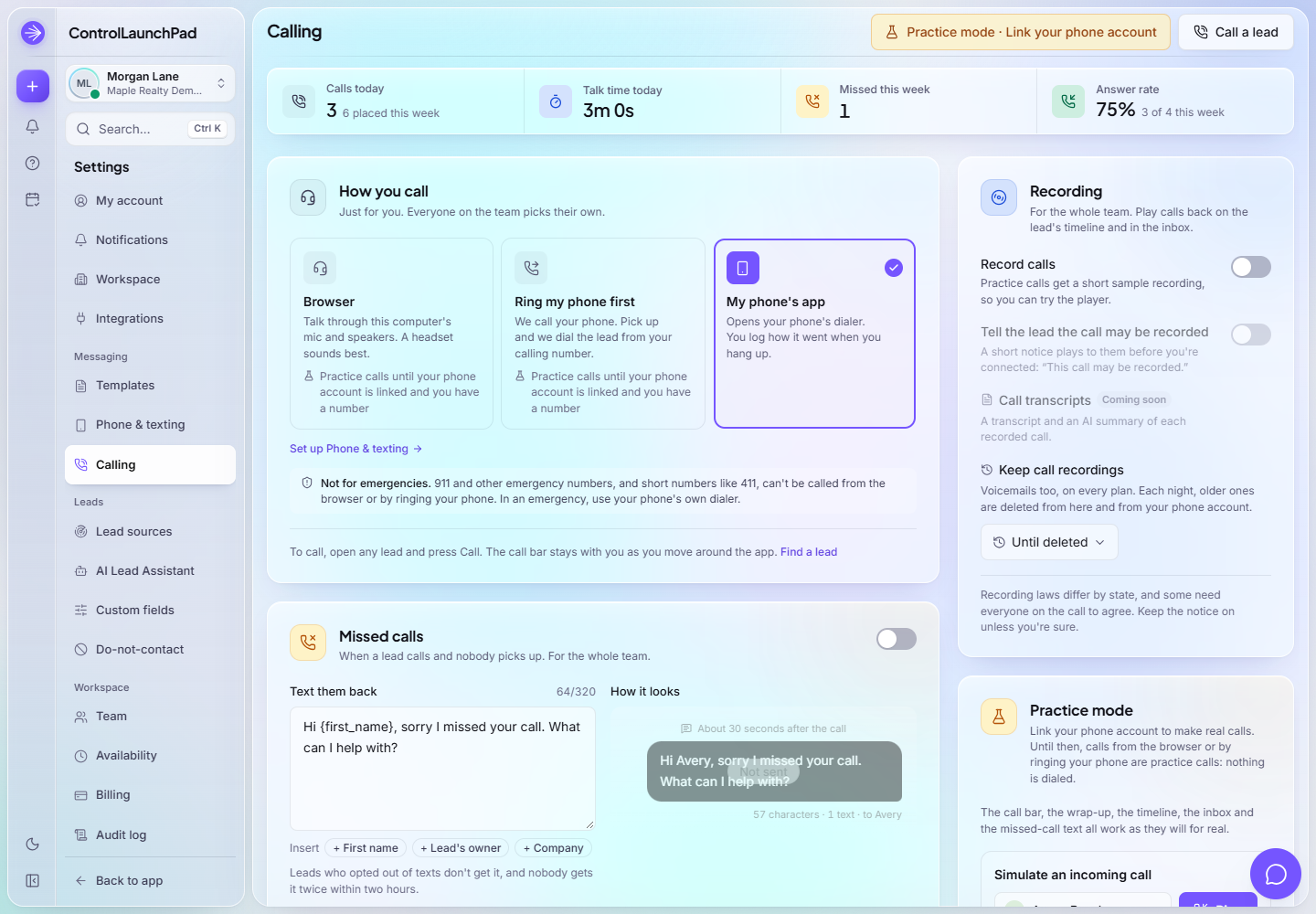
Open Settings → Calling and review How you call. Browser uses the computer's microphone and speakers; allow microphone access and use a headset where practical. Ring my phone first calls the saved personal phone, then connects the seller using the workspace calling number. My phone's app opens the device's own dialer and uses a separate manual call-logging flow. Availability depends on the connection shown in CLP.
Open your test lead and press Call. Confirm the caller number, audio and saved call outcome. Browser and ring-first calls remain practice calls until CLP's calling-readiness checks pass; a practice call dials nobody. Watch the Calling method controls (10:20) for a fictional practice-mode preview, not a live Twilio call.
Test incoming calls, outgoing texts and replies
Call the configured number from your separate test phone and confirm the expected teammate can receive it. For a Twilio SMS test, confirm Twilio is the selected texting provider and its Texting live checks are ready. Send a short message to that test phone, reply from it, and check the correct Inbox conversation in CLP. An active smrtPhone connection routes eligible texts through smrtPhone instead. Review the actual provider and status before retrying; Twilio's sent status means an upstream carrier accepted the message, while a later delivery callback provides a separate outcome when available.
Keep campaigns and automations off until the basic test works. Confirm the sender, recipient, message, current sending channel and opt-out state before starting real seller follow-up. Use the first-week CRM setup checklist to organize your team's connection and handoff checks.
Illustrative seller scenario
Route a seller consultation to the right acquisition teammate
A fictional acquisition team assigns one ready Twilio line to Morgan and keeps another as the default. A seller calls Morgan's line; CLP rings that teammate first, with missed-call handling following the workspace's Calling settings. After an agreed consultation, Morgan reviews the seller's history and sends an eligible follow-up from the Inbox. The team tests the line with a phone it controls before sharing it with sellers.
Set up your workspace for this workflow
Account linking, calling and texting are separate milestones
Linked confirms the account connection, not that every channel is live. Calling depends on the account, funds and eligible number. CLP's Twilio texting path holds all outgoing texts until the relevant campaign is approved and an active number is registered on it. Plan allowances, recipient opt-outs and sending rules still apply after the connection is ready.
Use the texting provider actually active in the workspace
Linking Twilio for calls does not replace an active smrtPhone texting connection. When smrtPhone is active, eligible Inbox, scheduled, campaign, automation and appointment SMS uses its verified lines. Its own readiness, recipient and feature rules still apply; an unusable smrtPhone connection does not silently send through Twilio. Review Phone & texting before assuming a sequence will use a particular provider.
Keep your seller's conversation and number consistent
A text reply prefers the eligible number already used in that conversation, then the sender's assigned line, then a suitable default. Automated steps use the lead owner's routing where applicable. Editing an assignment changes future routing choices; it does not send a message or independently transfer responsibility for all existing lead records.
Review call recording and missed-call settings deliberately
Calling includes workspace recording and missed-call controls. Review their enabled state and the notice your callers hear before real use. Call transcripts and their AI summaries are currently marked Coming soon. The browser and ring-first paths do not support emergency or short service numbers; use your phone's own dialer for emergencies.
Use registration for the messages you actually plan to send
Twilio requires A2P 10DLC registration for application SMS/MMS sent to US recipients from 10-digit long-code numbers. Provide a truthful use case and opt-in explanation. An approved campaign does not guarantee delivery or establish consent from an individual seller. Review the applicable provider requirements and your team's obligations before contacting people.
Common pitfalls and the next useful action
The account is linked, but calls still say practice mode
Read the calling reason in Phone & texting. Check whether the account is a trial, still setting up, needs a replacement key, has insufficient funds, or lacks an eligible active voice number. New numbers can remain locked while business registration needs attention. Refresh the status after resolving the stated issue.
Calls work, but every Twilio text is waiting
Check the active provider, account funds, campaign approval and each number's registration status. A voice-capable number and an approved business are not the same as a ready texting campaign. Keep messages on hold while fixing readiness, rather than repeatedly recreating them.
Replies arrive in another application
Review the service and numbers used in CLP. A provider-side webhook change can redirect inbound replies or delivery updates. Use Check now, inspect the adopted service's routing notice, and review Point replies here again when offered. Coordinate with anyone using the same account before changing a shared destination.
The browser call connects with no usable audio
Check CLP's microphone permission in the browser and operating system, the selected input/output devices, headset connection and network. Try the default microphone or an available alternative calling method. Mobile browsers can lose call connectivity in the background, so test the exact device and browser your teammate intends to use.
A text shows sent, failed or undelivered
Inspect the message's status and error in CLP and the matching Twilio messaging logs. Sent is not a read receipt or a guarantee of handset delivery. Confirm the destination and eligible sender, account state and registration; resolve the provider's stated error before resending the same message.
How this guide was reviewed
The CLP product team checked this guide against the current account-linking, provisioning, registration, number-routing and calling interfaces, plus Twilio's linked API-key, Voice SDK, messaging and webhook documentation.
- The connection asks for an Account SID and a Standard API key SID and secret. CLP provisions its calling app, texting callbacks and webhook-signing setup; it does not ask customers to paste their Twilio Auth Token.
- Calling and texting have separate readiness checks. In production, browser and ring-first calls through a linked trial account remain practice calls. Twilio texts are held until there is an upgraded, funded, connected account, a matching approved campaign and an active number registered on it.
- Using an existing campaign changes where selected numbers' incoming calls, replies and delivery updates go. The confirmation shows this routing change before it is applied. An active smrtPhone connection remains selected for eligible Inbox, scheduled, campaign and automation SMS; linking Twilio for calling does not override it.
This was a source and documentation review, not a fresh live Twilio registration, call or SMS test. Screenshots use fictional data in practice mode. Carrier review, available numbers, provider account restrictions and enabled CLP settings affect readiness. A linked badge, sample call or accepted send request does not establish real delivery, registration approval or a seller's permission to be contacted.
Sources and setup documentation
- Open CLP Phone & texting
- CLP smrtPhone texting scope and setup
- CLP Security & Data
- Twilio: API key types and access
- Twilio: US A2P 10DLC registration
- Twilio: Voice JavaScript SDK and browser limits
- Twilio: webhook configuration settings
- Twilio: track outgoing message status
- Twilio: diagnose undelivered messages
Twilio calling and texting questions
Which Twilio credentials do I enter in CLP?
Enter the Account SID, Standard API key SID and API key secret from the same Twilio account. CLP does not ask you to paste the account Auth Token. Do not share the API key secret in chat, screenshots or public forms. Phone account settings lets an authorized settings manager replace the key later.
Can a Twilio trial account make live calls or texts in CLP?
CLP's browser and ring-first calls through a linked trial account remain practice calls, and its Twilio texts are held. Upgrade the account and complete the readiness steps shown in Phone & texting. A practice call dials nobody. Review any waiting test messages before making the texting connection live.
Do I need to copy incoming SMS and status webhook URLs into Twilio?
For CLP's linked-account setup, CLP normally configures its calling app, incoming messaging and status callbacks automatically. Review Phone account settings and Check now. Bringing an existing campaign into CLP changes its relevant routing after confirmation; do not substitute the separate smrtPhone webhook links or arbitrary URLs.
Can I keep existing Twilio numbers and a registered campaign?
CLP can discover an eligible texting service already in the connected account. Review Use this campaign, the selected numbers and the destination-change confirmation. This retains that service's registration and numbers instead of moving them into a new texting service. An under-review campaign must still be approved before its texts can go out.
Can I assign different Twilio numbers to acquisition teammates?
Yes. In Phone & texting, an authorized settings manager can edit a number's label, assign it to an eligible teammate and choose a default. This setup allows one assigned line per teammate. The existing conversation number, number readiness and registration limits also affect which line a text can use.
Why can I call before I can send a text?
CLP checks calling and texting separately. Calls can work with a ready voice number while the texting campaign or number registration is unfinished. Twilio texts remain held until their own readiness checks pass, including the matching approved campaign and active registered number.
Can I use Twilio calls while smrtPhone handles texts?
Yes, the Twilio calling setup is separate. An active smrtPhone connection remains the provider for eligible Inbox, scheduled, campaign, automation and appointment SMS through verified lines. Its readiness, plan and recipient rules still apply. Linking Twilio alone does not override that selection or provide a silent fallback when smrtPhone is held.
Are Twilio numbers, calls and texts included in the CLP subscription?
The connected Twilio account is billed separately by Twilio for its numbers, usage and applicable registration costs. Review the current provider charges before buying a number or submitting registration. Linking an account does not add funds or make carrier approval automatic.
What happens if I unlink Twilio from CLP?
Calls through the connection return to practice mode and its calls and texts stop arriving in CLP. Your numbers stay in the Twilio account and can still be billed there. CLP removes resources it created as part of unlinking; an adopted service and its registration stay yours. Unlinking is refused while a call is active, and it is not the same as releasing a paid number in Twilio.
How should I verify the connection before contacting sellers?
Use a test lead and a separate phone you control. Confirm an outbound call, an incoming call to the assigned line, an eligible outgoing text and its reply in the correct CLP Inbox conversation. Review the delivery outcome and caller/sender identity. Keep campaigns and automations off until those basic checks pass.
Try this workflow with your next seller lead
Start a 14-day free trial, set up your channels, and walk through the steps with a test lead.